Compress to File Size
Pick the limit a form asks for. Each file is squeezed under it while keeping as much quality as possible.
How it works
Photos are re-saved at several quality levels to find the highest one under your limit; if even the lowest is too big, the dimensions are reduced a little and the search repeats. PDFs are re-drawn as images at lower resolution until they fit. Files already under the limit are left untouched.
Tried with a sample file
Screens and numbers from actually running this tool with a sample file with no personal data (2026-10-06, Chromium-based browser on a Mac). Results vary with your input and device.
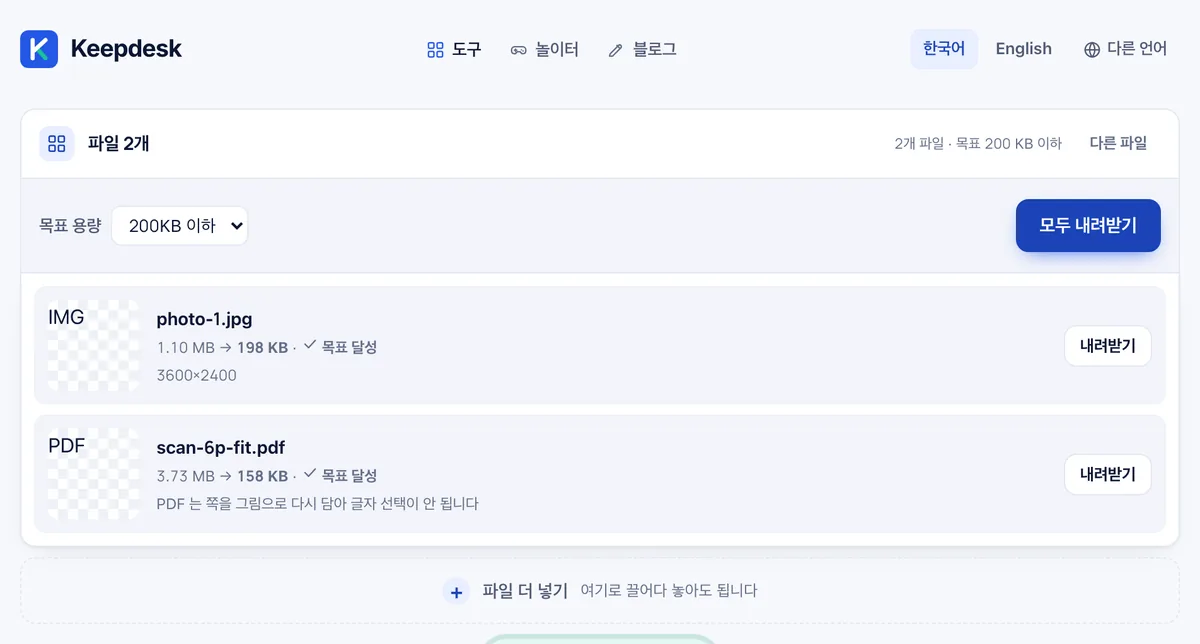
We added one photo (1.10 MB) and a 6-page scanned PDF (3.73 MB), then set the target to '200 KB or less.' The photo came out at 198 KB and the PDF at 158 KB — both marked 'target met' — and were delivered in a single ZIP (356 KB).
The PDF is re-rendered as images to reduce size, so text in the output cannot be selected. Target options are 100 KB, 200 KB, 300 KB, 500 KB, 1 MB, 2 MB, 5 MB, 10 MB, and custom entry.
Frequently asked
Is anything uploaded?
No. Everything happens in your browser.
Can PDFs keep selectable text?
No — pages are re-drawn as images to hit the size.