Barcode Generator
Type a number and it draws. EAN-13 and UPC-A for products, Code 128 for inventory and shipping. SVG scales without blur.
Which type
EAN-13 is the retail product barcode used worldwide (the last digit is a check digit); UPC-A is the 12-digit North American version. Code 128 holds letters, digits and symbols and is used for inventory labels, shipment references and asset tags. Long runs of digits are drawn in the denser Subset C automatically.
Where product numbers come from
EAN and UPC numbers are issued by GS1 member organisations (GS1 US, GS1 UK and so on). This tool only draws a number you already have; it does not issue numbers. A made-up number works for your own stockroom but cannot be listed with retailers.
The check digit
The last digit of an EAN or UPC is calculated from the others. Enter 12 digits (EAN-13) or 11 (UPC-A) and it is appended; enter 13 with a wrong check digit and the correct one is shown. Code 128's check character is embedded in the bars and not printed.
Printing
Give label printers and print shops the SVG; PNG is for screens and documents. Keep the blank quiet zone on both sides, scanners need it. The minimum bar width depends on the printer; 0.33 mm at 300 dpi is a safe floor.
Tips for common situations
Code 128 Auto-Compresses Digit Runs
When generating labels for alphanumeric SKUs or serial numbers, Code 128 automatically compresses consecutive digit sequences into dense pairs, keeping barcode widths compact. Adjust bar width and height to fit standard thermal label rolls used by industrial scanners.
Use EAN-8 for Compact Packaging
Products with limited label space such as cosmetics or small batteries require the shorter 8-digit EAN-8 format. Enter just 7 digits and the check digit is auto-completed, then reduce bar height and width to fit narrow packaging surfaces.
Verify UPC-A Check Digits Before Print
After entering your GS1 product number, the tool instantly validates the check digit and flags errors with the correct value. Export as SVG for packaging designers to place directly into layout software without pixelation or scanning issues.
Tried with sample values
Screens and numbers from actually running this tool with sample values (2026-10-06, Chromium-based browser on a Mac). Results vary with your input and device.
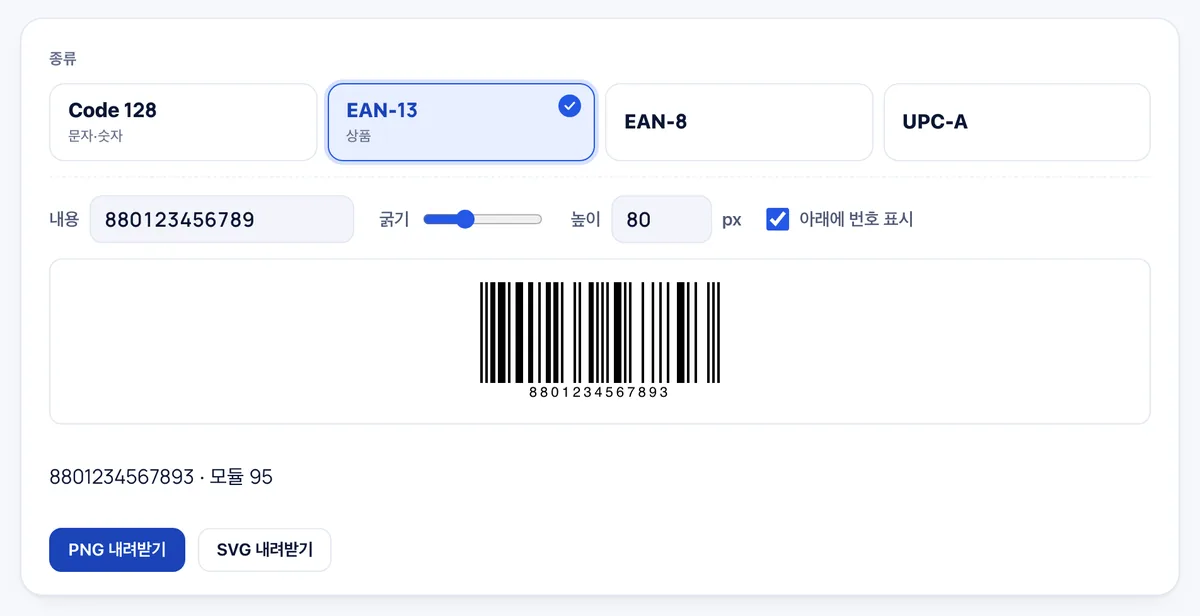
EAN-13 was selected and 880123456789 (12 digits) was entered. The check digit was calculated automatically, producing 8801234567893 with 95 modules. The barcode was downloaded as a 12 KB PNG.
Bar width, height, and number display can be adjusted, and SVG export is also available. The EAN number itself must be obtained from a GS1 member organization.
Frequently asked
Is anything uploaded?
No. The barcode is drawn in your browser and contains no tracking.
Can it encode non-Latin text?
By specification Code 128 carries ASCII only and EAN/UPC digits only. Use a QR code for other scripts.
The scanner won't read it
Usually the quiet zone was cropped, it was printed too small, or it was photographed off a screen. Print larger from the SVG.
Trademarks
QR Code is a registered trademark of DENSO WAVE INCORPORATED. GS1 is the name of the standards organisation. Keepdesk is not affiliated with, sponsored by or endorsed by either.
Which barcode symbologies and formats are supported?
The generator supports Code 128 (ASCII), EAN-13 (12–13 digits), EAN-8, and UPC-A formats.
How does the tool handle missing or incorrect check digits for EAN/UPC?
The check digit is calculated automatically, and if an incorrect digit is entered, the tool flags it and provides the correct value.
Can I customize the bar dimensions and toggle the human-readable text?
Yes, you can adjust bar width and height, as well as toggle the display of human-readable text beneath the barcode.
Can this tool officially issue new barcode numbers for retail products?
No, it only generates images from existing data; official product barcode numbers must be obtained from an authorized GS1 organization.