Password Generator
Pick a length and character sets and get several at once. Option to drop look-alike characters (l·1·O·0).
How long is long enough
For a random password, length is strength. 16 characters mixing cases, digits and symbols is roughly 100 bits, beyond realistic guessing with current hardware. 12 is decent; 8 is the bare minimum many services accept.
Where the randomness comes from
The browser's crypto.getRandomValues (the operating system's random source), with character selection done without modulo bias. The values exist only on this page and are never stored or transmitted.
One per site
Most account takeovers reuse a password leaked from another site. Use a different one everywhere and let a password manager remember them.
Sites that reject symbols
Some sites refuse certain symbols. Turn symbols off and add about four characters of length to keep similar strength.
Tips for common situations
Toggle Look-Alike Exclusion for Readability
Enable the look-alike filter to drop visually ambiguous glyphs such as l, I, 1, O, and 0, making passwords easier to read on paper or type on mobile keyboards. Generate 3, 5, or 10 candidates at once and copy the most readable one.
Slide to 32+ Characters for Server Secrets
For root accounts, database credentials, and API keys, drag the length slider to 32 or above to achieve enterprise-grade entropy exceeding 128 bits. The tool is stateless — no passwords are stored, synced, or logged anywhere.
Include All Character Sets at 16+ Length
When creating passwords for web portals or financial accounts, enable uppercase, lowercase, digits, and symbols at 16 characters or longer for strong bit entropy. The generated string is never transmitted or recorded, so copy it immediately into your password manager.
Tried with sample values
Screens and numbers from actually running this tool with sample values (2026-10-06, Chromium-based browser on a Mac). Results vary with your input and device.
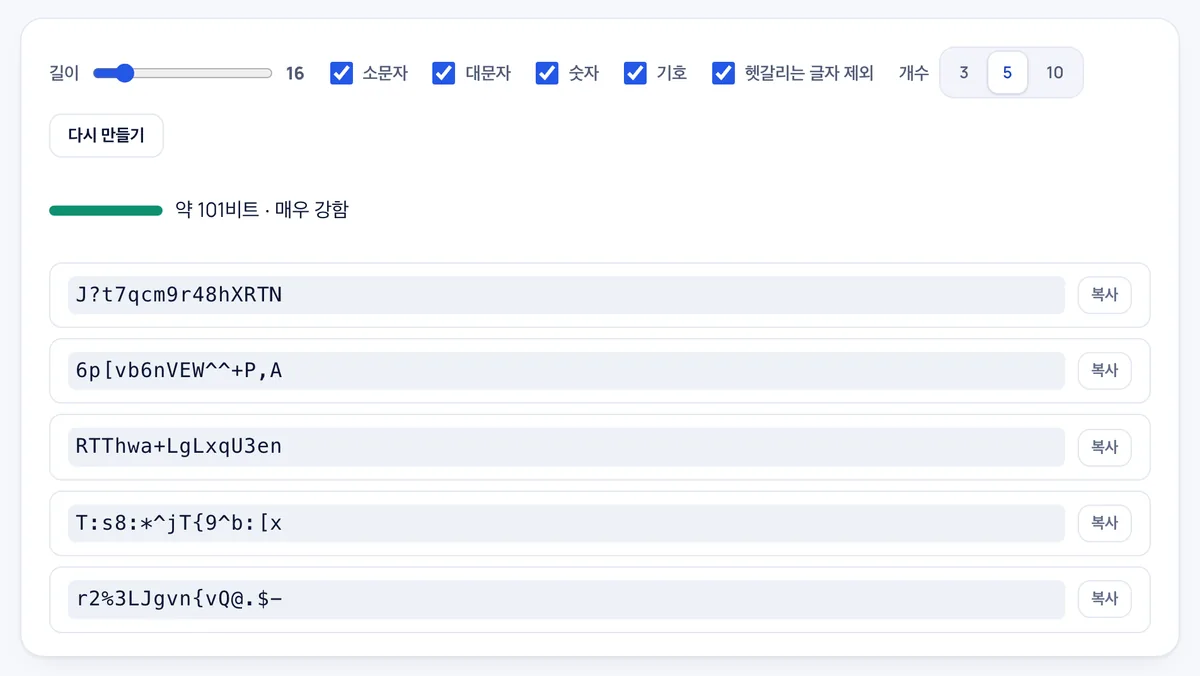
Five passwords were generated at once using the defaults: length 16, with lowercase, uppercase, digits, and symbols. Strength is rated at about 101 bits and labeled very strong. Each password has its own copy button.
Passwords are created with the browser's cryptographic random generator (crypto.getRandomValues) and are never stored or transmitted. An option to exclude easily confused characters (l, I, 1, O, 0, etc.) is available.
Frequently asked
Are generated passwords logged anywhere?
No. They are not recorded anywhere and disappear when you close the page.
What does 'no look-alikes' remove?
Lowercase l, uppercase I, digit 1, uppercase O, digit 0, lowercase o and the vertical bar. It avoids mistakes when writing or reading a password aloud.
Copy doesn't work
Some browser settings block the copy button. Select the text and copy manually.
What is the supported character length range for generated passwords?
You can set any password length between 8 and 64 characters to meet specific security requirements.
Can I choose specific character types like uppercase, numbers, or symbols?
Yes, you can individually include or exclude uppercase letters, lowercase letters, digits, and special symbols.
Can I generate multiple passwords in a single click?
Yes, you can generate 3, 5, or 10 unique passwords simultaneously, each equipped with its own copy button.
Does this tool save or store my generated passwords for later retrieval?
No, it is not a password manager; generated passwords are never saved, tracked, or sent anywhere for security reasons.