CSV ↔ Excel Converter
Garbled CSV in, readable CSV out. CSV and XLSX both ways.
Why characters break
A CSV does not say which encoding it uses. Excel guesses the system code page, so UTF-8 files with accents or non-Latin text come out garbled. Saving with a UTF-8 BOM makes it open correctly in Excel 2007 or later, Numbers and Google Sheets.
Leading zeros
Values are copied as text so ZIP codes, phone numbers and SKUs keep their leading zeros.
Trademarks
Excel is a trademark of Microsoft Corporation, Numbers of Apple Inc. and Google Sheets of Google LLC. Keepdesk is not affiliated with, sponsored by or endorsed by them.
Tips for common situations
Preview and Fix CSV Encoding Issues
The tool auto-detects UTF-8 or legacy encoding and renders a 30-row live preview so you can verify characters display correctly before saving. Export as UTF-8 with BOM CSV or XLSX to ensure the file opens properly in spreadsheet software.
Protect Leading Zeros in ID Columns
ZIP codes, phone numbers, and serial codes starting with zero are preserved as text strings, preventing spreadsheet software from truncating them into integers. Inspect the 30-row preview to confirm leading zeros remain intact, then export as XLSX or UTF-8 BOM CSV.
Extract a Single Sheet as CSV
Upload an XLSX or XLS workbook to see all available sheet tabs, then select the one you need to convert into a clean CSV file. Parsing runs locally via SheetJS CE in your browser, so confidential business data is never sent to an external server.
Tried with a sample file
Screens and numbers from actually running this tool with a sample file with no personal data (2026-10-06, Chromium-based browser on a Mac). Results vary with your input and device.
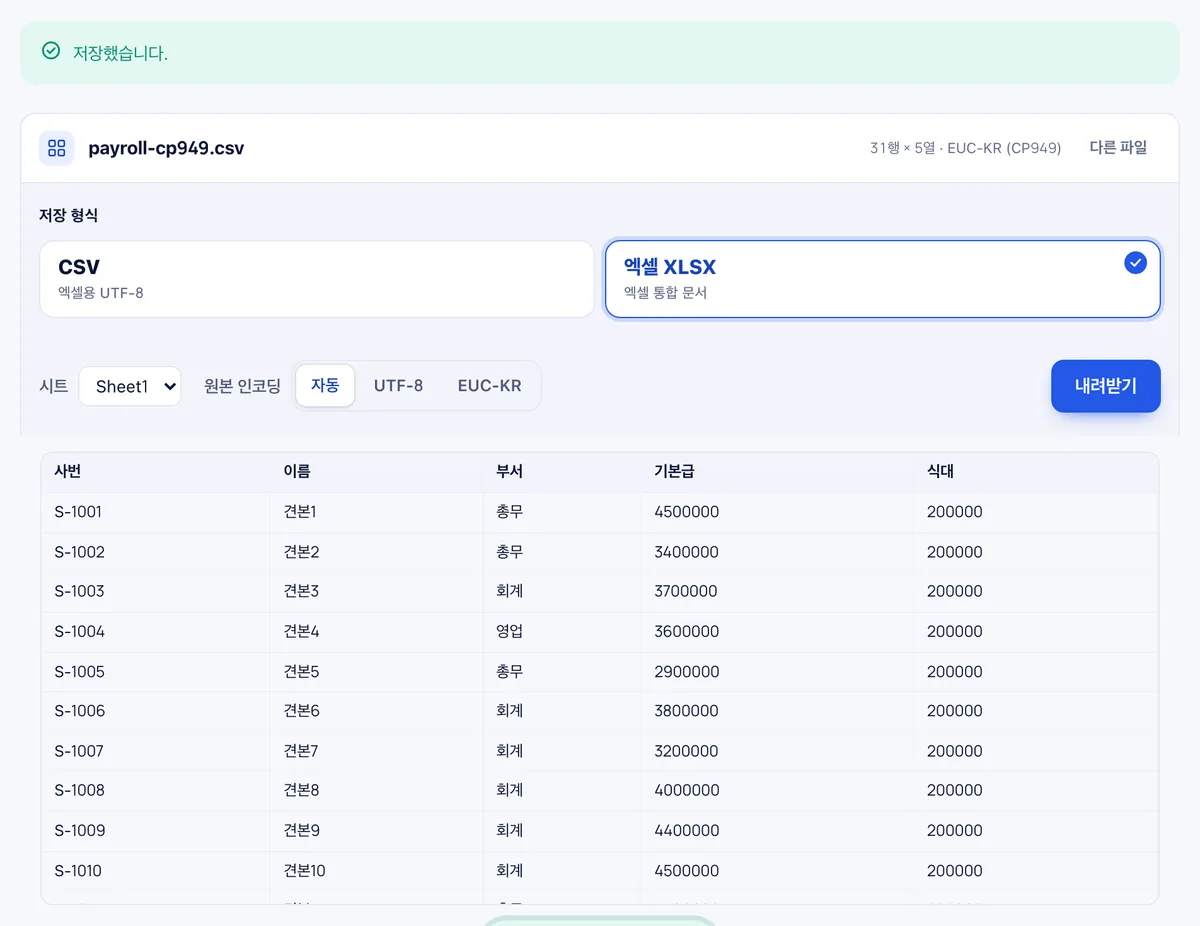
A sample CSV saved in Korean EUC-KR (CP949), 31 rows × 5 columns, was detected automatically and showed Korean correctly; saved as XLSX it was 21 KB. Choose 'UTF-8 for Excel' to keep it as CSV.
Frequently asked
Is the file uploaded?
No.
Formulas and formatting?
CSV has neither. Excel → CSV keeps calculated values only.
Will leading zeros in phone numbers or product codes be preserved after conversion?
Yes, the converter preserves leading zeros so numeric codes are not altered.
Can I select a specific sheet when converting a multi-sheet Excel file to CSV?
Yes, when converting XLSX or XLS files, you can choose which sheet to export to CSV.
Can I preview the decoded data before downloading the converted file?
Yes, you can view a 30-row table preview to verify the text before exporting.
How do I ensure converted CSV files display characters properly in Excel?
You can export the file as a UTF-8 BOM CSV, which prevents encoding errors when opened in Excel.