Percentage Calculator
The five percentage questions people actually ask, on one page. Change a number and it recalculates.
Percent change vs percentage points
48,000 → 52,800 is a 10% increase ((52,800 − 48,000) ÷ 48,000). An interest rate moving from 3% to 4% is a rise of 1 percentage point, which is a 33% increase in relative terms. Read % and pp differently in news and contracts.
Working back from a discounted price
If 71,200 is the price after 20% off, the list price is 71,200 ÷ 0.8 = 89,000. Multiplying by 1.2 (85,440) is wrong. Tax works the same way: divide by (1 + rate).
Stacked discounts
30% off then a further 10% is not 40% but 0.7 × 0.9 = 0.63, a 37% discount, because the second discount applies to the already reduced price.
Tips for common situations
Toggle Between Discount and Markup
Enter the sticker price and discount percentage to see the exact post-discount amount and total savings. Switch to the increase option in the same mode to calculate markups, surcharges, or sales tax additions on goods and services.
Reverse-Calculate the Original Price
When a receipt shows only the discounted total and the discount rate, use the reverse calculation to recover the pre-discount list price. The same method works for deriving the base cost from any result that already includes a percentage fee or tax.
Report-Ready Growth Rate in Two Decimals
Enter a baseline value and an updated value to get the net percentage change flagged as growth or contraction. Results are automatically rounded to two decimal places, ready for pitch decks, analytics reports, or spreadsheets.
Tried with sample values
Screens and numbers from actually running this tool with sample values (2026-10-06, Chromium-based browser on a Mac). Results vary with your input and device.
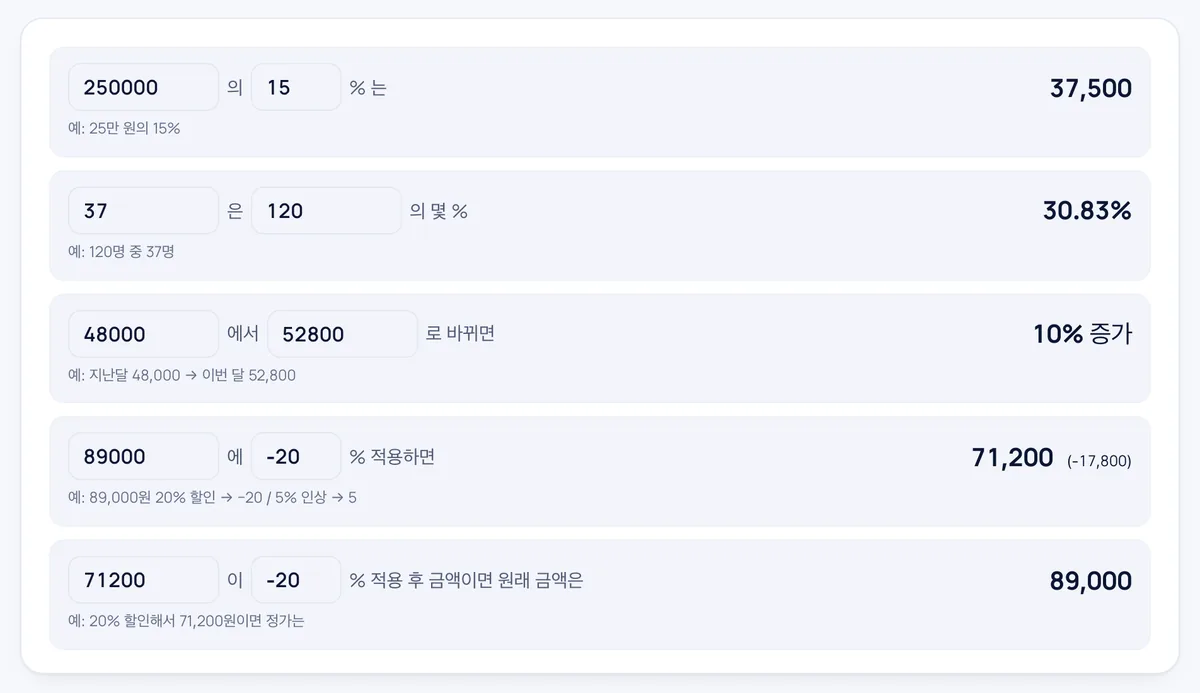
Five modes are shown on one page. 15% of 250,000 is 37,500; 37 out of 120 is 30.83%; a change from 48,000 to 52,800 is a 10% increase.
Applying −20 to 89,000 gives 71,200 (−17,800), and working backward from 71,200 as the adjusted amount returns the original 89,000. Results are rounded to two decimal places.
Frequently asked
Is anything sent anywhere?
No. The arithmetic runs in your browser.
How many decimals?
Results are rounded to two decimals; round money to whole units yourself.
Tax calculations?
Use the VAT / sales tax calculator for net ↔ gross with proper rounding.
Can I calculate the final price after a discount or markup?
Yes, you can calculate the result of applying an increase or discount percentage directly to a base amount.
Can I find the original price if I only know the discounted final amount?
Yes, the calculator provides a reverse calculation mode to recover the original value from the discounted or marked-up figure.
How do I calculate the percentage increase or decrease between two numbers?
Select the percent change (A→B) mode and enter the initial and new numbers to find the rate of change.
Do I need to create an account or pay to use this tool?
No, the calculator is completely free to use with no account registration required.