Color Code Converter
Paste one colour code and get HEX, RGB, HSL, HSV and HCV, plus whether it is readable as text.
Reading the contrast ratio
WCAG 2 sets 4.5:1 as the AA criterion for body text and 7:1 for AAA; large text (18pt, or bold 14pt) passes AA at 3:1. (WCAG is the W3C's web accessibility guideline.) Blue #2457E6 is about 5.9:1 on white, fine for body text, but 3.6:1 on black, which only suits large text.
Why HSL is handy
HSL separates hue, saturation and lightness, so making a colour lighter or darker means changing only L. The lightness scale below is exactly that; click a step to load it.
HSV and HCV
HSV (called HSB in Photoshop and Figma) is hue, saturation and value; it is the square in most colour pickers. V is the brightest channel, S how intense the colour is within it. HCV swaps saturation for chroma (C), the gap between the brightest and darkest channel. #2457E6 is hsv(224, 84%, 90%) and hcv(224, 76%, 90%). Neither is valid CSS, so use HEX, RGB or HSL in web code.
Accepted formats
#RGB, #RRGGBB, #RRGGBBAA, rgb()/rgba(), hsl()/hsla(), hsv()/hsb()/hcv(), a bare triple like '36, 87, 230', and about fifty common CSS colour names.
Tips for common situations
Click Lightness Steps to Fix Contrast
If your chosen colour fails WCAG AA (4.5:1), click one of the nine lightness chips below the picker to find a compliant shade without changing the hue. You can also test contrast against a custom background colour instead of only white or black.
Paste 8-Digit HEX for Instant Alpha Conversion
Enter a #RRGGBBAA code exported from your design tool and the alpha byte is automatically converted to a decimal value for CSS rgb() and hsl() syntax. The field also accepts 3-digit shorthand, bare triples, and over 50 CSS colour names.
Extract Brand Colour Shades in One Step
The tool splits your input colour into nine lightness levels while preserving the original hue and saturation, giving you a ready-made tonal scale for hover states, borders, and disabled elements. Each step shows its contrast ratio against white and black text for quick readability checks.
Tried with sample values
Screens and numbers from actually running this tool with sample values (2026-10-06, Chromium-based browser on a Mac). Results vary with your input and device.
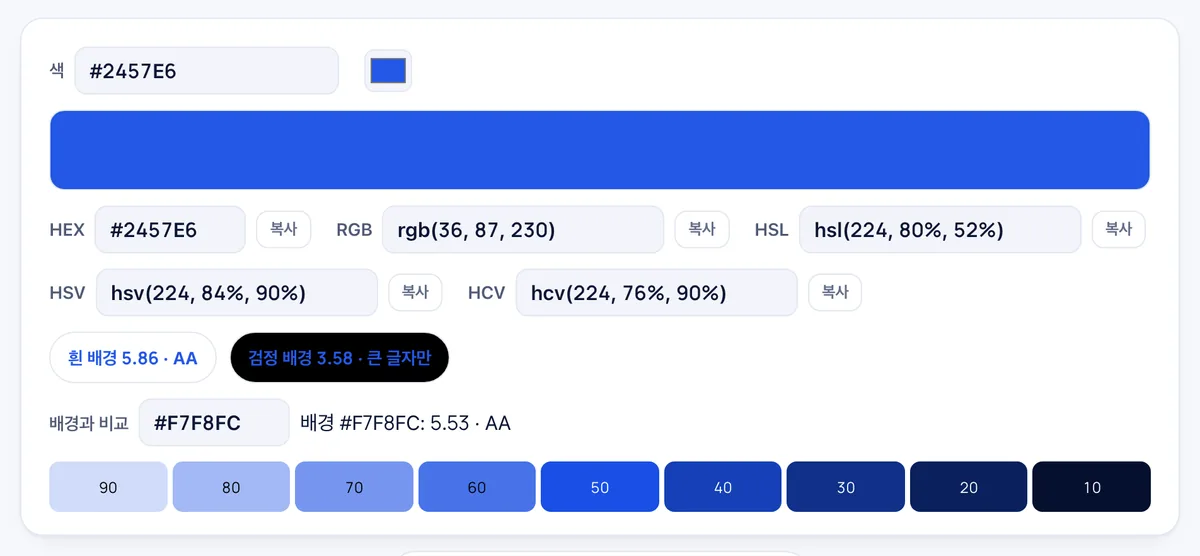
The default color is converted to HEX, RGB, HSL, HSV, and HCV. The contrast ratio against a white background is 5.86, passing WCAG AA, while against black it is 3.58—suitable for large text only.
Against a custom background (#F7F8FC) the contrast ratio is 5.53, meeting AA. Nine brightness steps of the same hue (90 through 10) are listed below, and clicking any step loads that color into the input.
Frequently asked
Is anything uploaded?
No. Conversion and contrast maths run in your browser.
What about alpha?
#RRGGBBAA and rgba() are reflected in the HEX and RGB output. Contrast ignores alpha and treats the colour as opaque.
CMYK?
Print CMYK depends on the colour profile, so it is out of scope here.
Which color formats can I convert between using this tool?
It converts across HEX (including alpha), rgb(), hsl(), raw number triples, and around 50 standard CSS color names.
Does the tool verify WCAG contrast ratios for accessibility?
Yes, it calculates contrast ratios against white, black, and custom backgrounds to check compliance with WCAG AA (4.5), AAA (7), and large text (3) standards.
Can I view different brightness shades of the same color?
Yes, it displays a 9-step lightness scale for the selected hue, and clicking any shade instantly loads its values.
Is there an interactive color picker available?
Yes, you can pick colors visually using the built-in color picker interface in addition to typing code values.