URL Encode & Decode
Paste a URL full of %20 and %E2%80%A6 to read it, or encode a value safely. Query parameters are listed below.
Why %20 appears
URLs allow only letters, digits and a few symbols, so spaces and non-ASCII characters are written as UTF-8 bytes in %XX form.
Value vs whole URL
Encode a single query value with the default, which also escapes & = and ?. Switch on 'whole URL' only for a complete address.
Spaces and +
HTML form submissions write spaces as +. Turn on 'space ↔ +' when decoding those.
Tips for common situations
Escape Reserved Characters in API Values
Use component mode to rigorously escape ampersands, slashes, and hash symbols within individual parameter values so the backend parser receives clean data. Toggle the space option between %20 and + to match your target endpoint's expected query format.
Encode UTM Campaign Values Separately
When building UTM tracking links with non-ASCII campaign names, encode only the parameter value and paste it after the key. Encoding the entire URL at once converts delimiters like ?, &, and = and breaks the link structure.
Decode Tracking Links and Inspect Tags
Paste a percent-encoded marketing or redirect URL to instantly decode it into readable text with validation for malformed sequences. The query string is automatically parsed into a structured table showing each parameter key alongside its decoded value.
Tried with sample values
Screens and numbers from actually running this tool with sample values (2026-10-06, Chromium-based browser on a Mac). Results vary with your input and device.
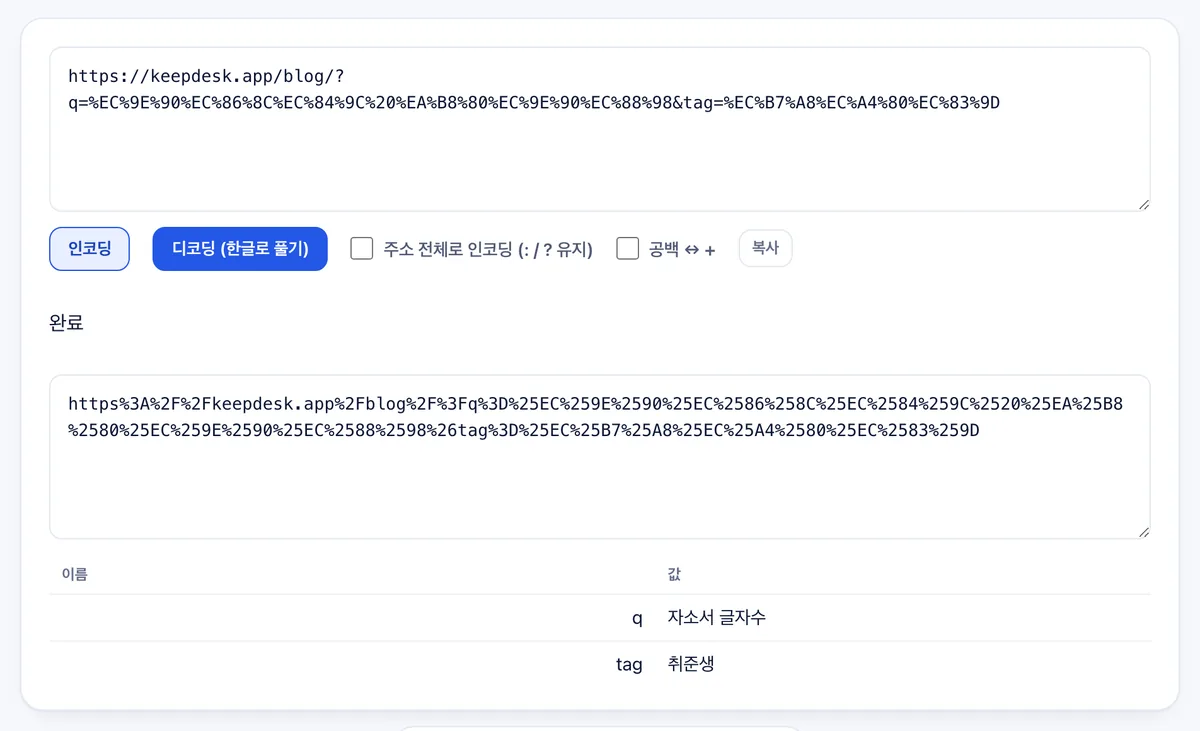
Clicking the encode button produces the encoded URL and displays 'Done.' Query parameters in the URL are broken out into a table of names and values.
In this example, the parameter q contains '자소서 글자수' and tag contains '취준생.' The 'encode full URL' option preserves colons, slashes, and question marks while encoding the rest.
Frequently asked
Is anything uploaded?
No.
Decoding fails
There is a % not followed by two hex digits, usually a truncated URL.
What is the table?
Each name=value pair after the ?, decoded. Handy for checking tracking parameters.
What is the difference between encoding a parameter value versus a full URL?
Parameter value mode (encodeURIComponent) encodes all special characters including / and ?, while whole-URL mode (encodeURI) preserves URL structure delimiters.
Can I encode spaces as plus signs (+) instead of %20?
Yes, the space↔+ option allows you to toggle whether spaces are represented as %20 or + during encoding and decoding.
How does the tool display query string parameters from a URL?
It automatically parses the query string following ? and presents each key and value pair in a structured table.
Does the tool provide URL shortening or link availability checking?
No, it focuses exclusively on encoding, decoding, and parsing URLs, with no URL shortener or link verification features.